Model Steering — Proving Causation
Steering is the definitive proof of your research. By manipulating specific features during generation, you demonstrate that a feature causally influences model behavior — not just correlates with it.
Steering Modes
miStudio provides three distinct steering modes:
| Mode | What It Does | Best For |
|---|---|---|
| Individual | One feature at multiple strengths | Understanding a single feature's dose-response curve |
| Comparison | Multiple features at the same strength, side-by-side | Comparing related features (e.g., "French" vs "German") |
| Combined | All selected features applied simultaneously | Discovering synergistic effects between features |
Strength Values
Steering strengths are raw coefficients added to the model's residual stream, compatible with Neuronpedia's scale:
| Range | Effect | Example |
|---|---|---|
| 0 | No intervention (baseline) | Unsteered output |
| 0.07 – 5 | Subtle influence | Slight shift in topic or tone |
| 5 – 50 | Moderate effect | Clear behavioral change |
| 50 – 100 | Strong effect | Dominant feature influence |
| 100 – 200 | Very strong | Feature overwhelms other signals |
| 200 – 300 | Extreme | Often causes repetition or collapse |
| Negative | Suppression | Inhibits the feature's concept |
The effective range depends on the SAE and layer. Start with strengths around 5–20 and increase gradually. Values above ±100 frequently cause the model to "collapse" into repetitive or incoherent output.
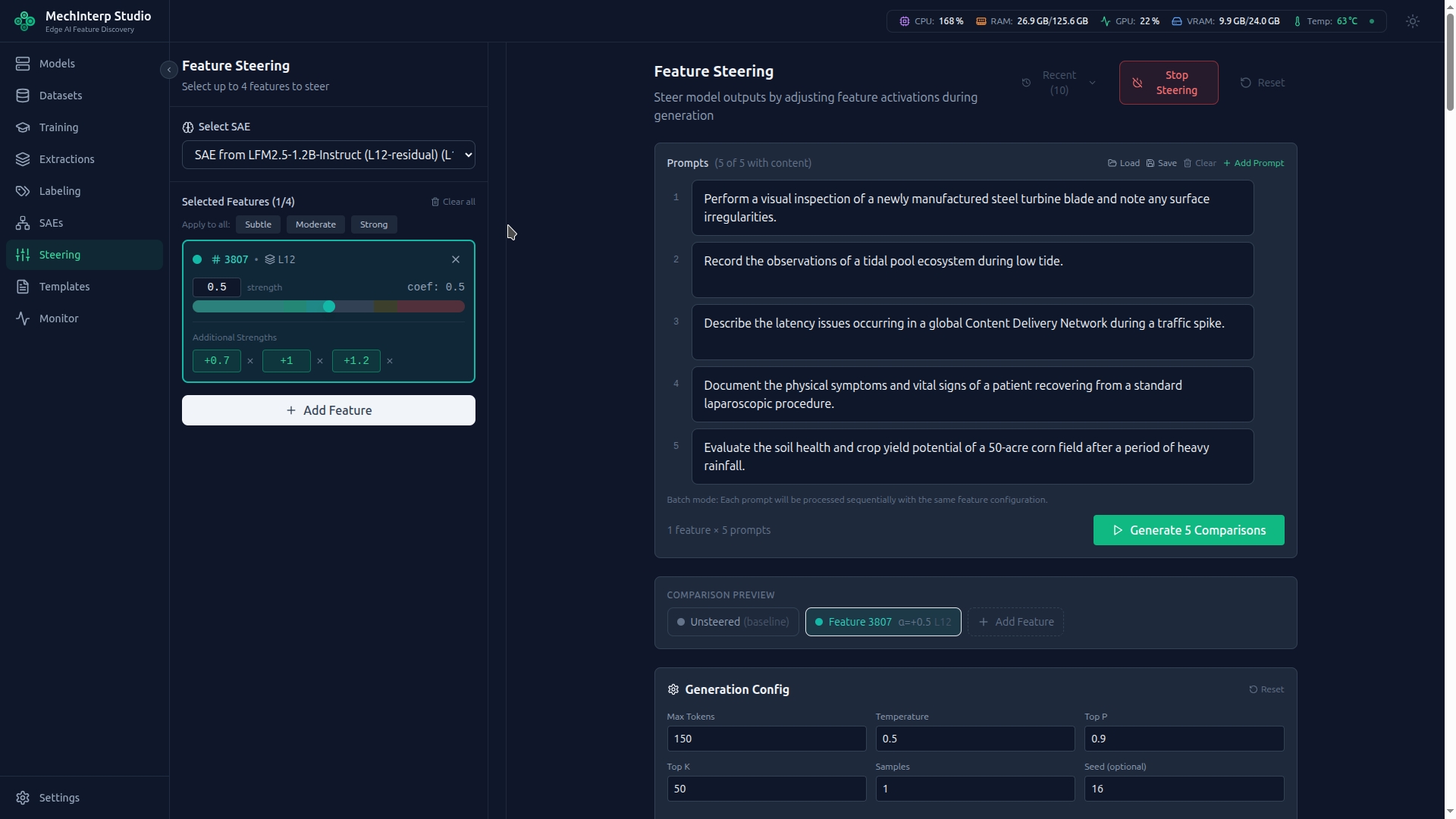
Each feature supports up to 3 additional strengths tested simultaneously. Set a primary strength and additional values to see the dose-response curve in one generation pass. For example: primary=10, additional=[5, 20, 50].
Generation Parameters
| Parameter | Default | Range | Effect |
|---|---|---|---|
| Max Tokens | 100 | 1–2,048 | Length of generated text |
| Temperature | 0.7 | 0–2.0 | Randomness. 0 = deterministic, 1.0 = creative |
| Top-P | 0.9 | 0–1.0 | Nucleus sampling threshold |
| Top-K | 50 | 0–500 | Vocabulary restriction per token |
| Repetition Penalty | 1.15 | 0.5–2.0 | Penalizes repeated tokens. Increase if output loops. |
| Seed | — | Optional | Set for reproducible results across runs |
The Matrix Testing Workflow
Unlike tools with a single slider, miStudio uses a grid approach:
- Select Features: Add up to 4 features (e.g., "Honesty" + "French Language")
- Add Prompts: Multiple test prompts processed in batch
- Configure Strengths: Set primary and additional strengths per feature
- Include Baseline: Toggle "Include Unsteered" to compare against the natural output
- Execute: miStudio runs all combinations, presenting results in a structured comparison view
Steering multiple features simultaneously is NOT the same as running them separately. "Scientific Tone" + "Excitement" combined may produce different text than either alone. Combined mode reveals circuit behavior where features interact.
Viewing Results
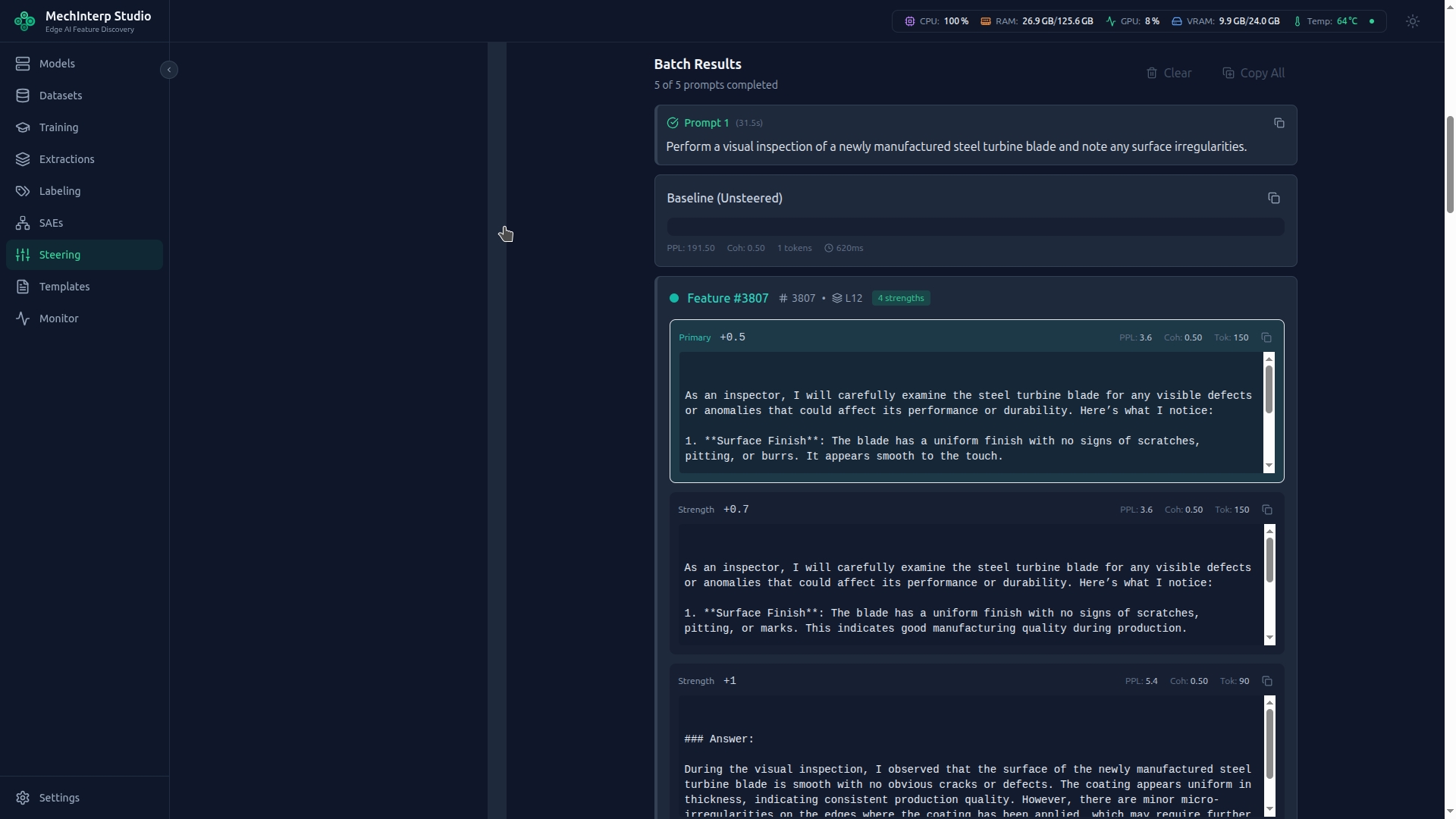
After execution, results are presented in a structured comparison view showing baseline and steered outputs side-by-side with perplexity metrics: